

[Jun 28, 2026] F5 Dumps - Learn How To Deal With The (F5CAB1) Exam Anxiety
DEMO FREE BEFORE YOU BUY F5CAB1 DUMPS
NEW QUESTION # 12
Which of the following areresource allocation (provisioning) settingsfor BIG-IP modules?
(Choose two.)
- A. Nominal
- B. Dedicated
- C. Maximum
- D. Limited
Answer: A,B
Explanation:
BIG-IP module provisioning determines howCPU, memory, and disk resourcesare allocated to each licensed module. F5 defines a specific set of supported provisioning levels.
Valid provisioning (resource allocation) settings
Nominal
* Allocates a standard, balanced amount of system resources to a module.
* Intended for typical production deployments where multiple modules may be provisioned at the same time.
Dedicated
* Allocatesall available system resourcesto a single module.
* Used when the BIG-IP device is dedicated to running only one module (for example, ASM-only or APM-only deployments).
* No other modules can be provisioned when one is set to Dedicated.
These two options are valid and supported provisioning levels.
Why the other options are incorrect
Maximum
* This is not a valid BIG-IP provisioning level.
* BIG-IP does not use "Maximum" as a resource allocation setting.
Limited
* This is also not a supported provisioning level.
* BIG-IP uses levels such as None, Minimal, Nominal, and Dedicated (module-dependent), not Limited.
NEW QUESTION # 13
Which port is an exception to the Port Lockdown function of Self-IPs if a device-group synchronization cluster is configured?
- A. TCP 4353
- B. TCP 443
- C. UDP 53
Answer: A
Explanation:
Self-IPs implement a security feature known asPort Lockdown, which limits which services are reachable on a Self-IP.
However, certain services required for BIG-IP device-to-device communication bypass Port Lockdown to ensure cluster and HA functionality.
TCP 4353
* TCP port4353is used byDevice Service Clustering (DSC)for:
* Device trust establishment
* Configuration synchronization
* Failover communication
* Because BIG-IP devices must always be able to communicate for HA functions to remain operational, port 4353 isexempt from Port Lockdown rules.
Why the other options are incorrect
A). TCP 443
* Not required for device trust or synchronization.
* HTTPS access is fully controlled by Port Lockdown.
C). UDP 53
* DNS traffic is not required for synchronization and has no exemption under Port Lockdown.
NEW QUESTION # 14
Refer to the exhibit.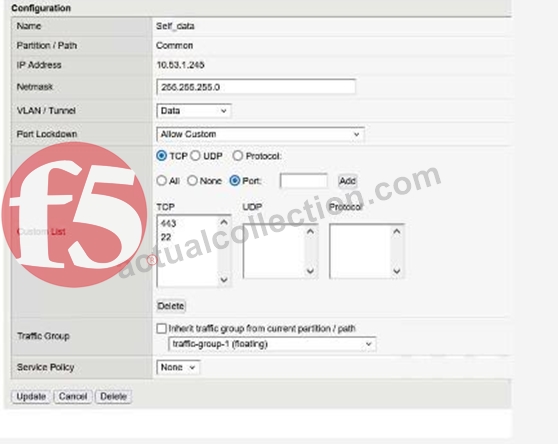
What traffic will be permitted to reach the BIG-IP?
- A. SSH
- B. FTP
- C. Telnet
Answer: A
Explanation:
The exhibit shows the configuration of aSelf IPwith:
* Port Lockdown: Allow Custom
* ACustom Listthat includes the following TCP ports:
* 443
* 22
Meaning of these ports:
* TCP 443# HTTPS (TMUI - web-based management)
* TCP 22# SSH (command-line remote access)
No other TCP, UDP, or protocol entries are listed; therefore, only these two services are allowed to reach the BIG-IP via this Self IP.
Evaluating the answer choices:
Option
Service
Port
Allowed?
FTP
TCP 21
Not listed
Not allowed
SSH
TCP 22
Listed
Allowed
Telnet
TCP 23
Not listed
Not allowed
Thus,SSHis the only traffic permitted through this Self IP configuration.
NEW QUESTION # 15
The BIG-IP Administrator uses Secure Copy Protocol (SCP) to upload a TMOS image to the/shared/images/ directory in preparation for a TMOS upgrade.
After the upload is completed, what will the system dobeforethe image is shown in the GUI under:
System - Software Management - Image List?
- A. The system performs a reboot into a new partition
- B. The system verifies the internal checksum
- C. The system copies the image to /var/local/images/
Answer: B
Explanation:
When a TMOS image (.iso file) is uploaded into the/shared/images/directory, the BIG-IP performs an internal validation step before the ISO appears in the GUI.
1. The system verifies the internal checksum
* BIG-IP automatically reads the embedded checksum inside the ISO file
* Verifies integrity of the uploaded image
* Confirms the file is not corrupted or incomplete
* Ensures the image is a valid F5 TMOS software image
Only after this checksum verification succeeds does the image appear under:
System # Software Management # Image List
Why the other options are incorrect:
A). The system performs a reboot into a new partition
* Uploading an ISO file never triggers a reboot.
C). The system copies the image to /var/local/images/
* All valid TMOS images remain in/shared/images/.
* No copying occurs.
NEW QUESTION # 16
The Configuration Utility of a BIG-IP device is currently accessible via its management IP10.53.1.245from all VLANs.
The BIG-IP Administrator needs to restrict access so only hosts from the10.0.0.0/24subnet can access the Configuration Utility.
Which TMSH command accomplishes this?
- A. (tmos)# create /net acl MGMT.HTTP rule add { (permit tcp 10.0.0.0/24 10.53.1.245 http) (deny ip any any http) }
- B. (tmos)# create /net acl MGMT.HTTP rule add { (permit tcp 10.0.0.0 0.0.0.255 host 10.53.1.245 http) }
- C. (tmos)# modify /ltm httpd allow replace-all-with {10.0.0.0/24}
- D. (tmos)# modify /sys httpd allow replace-all-with {10.0.0.0/24}
Answer: D
Explanation:
BIG-IP controls access to the web-based Configuration Utility (TMUI) through the/sys httpd allowlist. This parameter specifies which client IPs or subnets may initiate HTTP/HTTPS connections to the management interface.
To restrict TMUI access toonlythe 10.0.0.0/24 subnet:
* The correct method is tomodify the HTTPD allow listso that it contains only this subnet.
* This requires replacing the entire current list with the new subnet using:
modify /sys httpd allow replace-all-with {10.0.0.0/24}
This ensures thatonlyclients within 10.0.0.0/24 can reach the Configuration Utility.
Why the other options are incorrect:
* Options A and Ccreate network ACL objects under /net acl, which apply to data-plane traffic, not management-plane TMUI access. TMUI access is not controlled by LTM ACLs but by the HTTPD allow directive.
* Option Bis incorrect syntax and references /ltm httpd, which is not the proper object; the correct hierarchy is /sys httpd.
Thus, only modifying the/sys httpd allowlist achieves the required restriction.
NEW QUESTION # 17
A BIG-IP Administrator plans to upgrade a BIG-IP device to the latest TMOS version.
Which two tools could the administrator leverage to verify known issues for the target versions? (Choose two.)
- A. F5 Downloads
- B. F5 University
- C. F5 Bug Tracker
- D. F5 End User Diagnostics (EUD)
- E. F5 iHealth
Answer: C,E
Explanation:
Comprehensive and Detailed Explanation (Paraphrased from F5 BIG-IP Administration Install, Initial Configuration, and Upgrade concepts) When performing a TMOS upgrade, F5 recommends validating the target software version to ensure that the release does not contain defects that may impact system behavior. The upgrade preparation process includes checking for known issues, validating compatibility, and reviewing advisory information for the intended version. Two primary F5 tools serve this purpose:
B). F5 iHealth
iHealth is a cloud-based diagnostic and analysis platform used to evaluate the operational state of a BIG-IP system.
Administrators upload a QKView file to iHealth to receive an automated assessment of the system. As part of upgrade planning, iHealth provides:
* Version-specific issue analysis, comparing the system's configuration and hardware against F5's internal catalog of published issues.
* Upgrade advisories, identifying potential risks such as deprecated features, module compatibility concerns, or changes in behavior between TMOS versions.
* Checks against known defects, allowing administrators to determine whether the target TMOS version contains issues relevant to their deployment.
This aligns with F5's recommended upgrade workflow, where iHealth is used before upgrading to confirm system readiness and detect software-level concerns.
D). F5 Bug Tracker
The Bug Tracker is F5's dedicated interface for reviewing software defects across TMOS releases.
It enables administrators to:
* Search forknown bugs by TMOS version, module, severity, or defect ID.
* Review thestatus of defects(open, resolved, fixed in later releases).
* Identify whether high-impact or security-related issues are associated with the target upgrade version.
F5 documentation emphasizes reviewing known defects prior to installation of new software images, making the Bug Tracker a critical resource for upgrade validation.
Why the other options are not correct
A). F5 End User Diagnostics (EUD)
EUD is used exclusively forhardware diagnostics(ports, memory, fans). It does not provide software-related issue verification and is not used for upgrade planning.
C). F5 University
This is atraining platform, not an operational tool. It does not provide defect listings or upgrade-specific warnings.
E). F5 Downloads
Although it provides access to software images and release notes, it isnot a tool for identifying known bugs.
Release notes summarize general fixes and features, but systematic bug verification requires iHealth or the Bug Tracker.
NEW QUESTION # 18
Refer to the exhibit.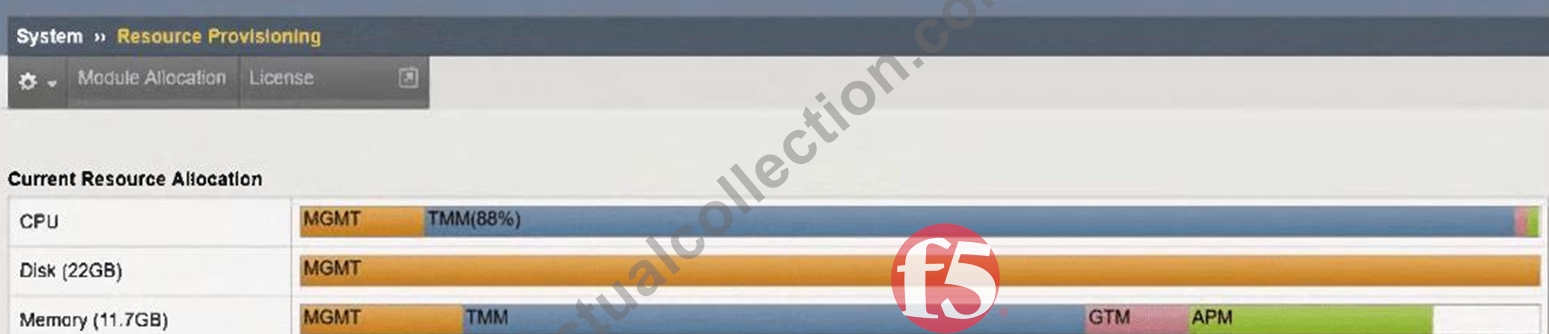
An organization has purchased a BIG-IP license that includes all available modules but has chosen to provision only the modules they require.
The exhibit displays the current resource allocation from theSystem # Resource Provisioningpage.
Based on the information provided, which F5 modules have been provisioned?
- A. TMM, DNS, APS
- B. DNS, APM
- C. LTM, APM
- D. LTM, DNS, APM
Answer: D
Explanation:
The exhibit shows theCurrent Resource Allocationfor:
* CPU
* Disk
* Memory
In particular, theMemory Allocationbar displays the modules that are currently provisioned.
Memory is the most reliable indicator because BIG-IP allocates memoryonlyto modules that are actively provisioned.
From the exhibit:
* MGMT(Management) - always present
* TMM(Traffic Management Microkernel) - indicatesLTM is provisioned
* GTM- this label indicates that theDNS moduleis provisioned (GTM = Global Traffic Manager, now called DNS)
* APM- explicitly shown, indicatingAccess Policy Manageris provisioned
Therefore, the provisioned modules are:
* LTM(implied by TMM allocation)
* DNS/GTM
* APM
This matchesOption C: LTM, DNS, APM.
NEW QUESTION # 19
Refer to the exhibit.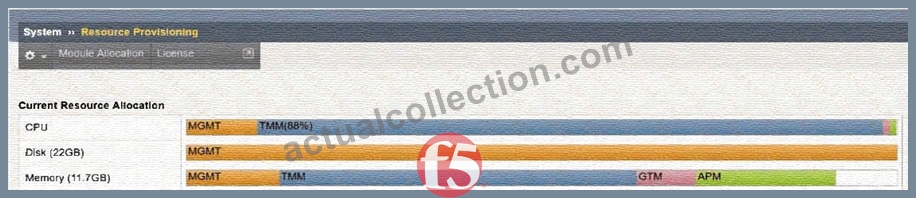
An organization has purchased a BIG-IP license that includes all available modules but has chosen to provision only the modules they require.
The exhibit displays the current resource allocation from theSystem # Resource Provisioningpage.
Based on the information provided, which F5 modules have been provisioned?
- A. TMM, DNS, APS
- B. DNS, APM
- C. LTM, APM
- D. LTM, DNS, APM
Answer: D
Explanation:
The exhibit shows theCurrent Resource Allocationfor:
* CPU
* Disk
* Memory
In particular, theMemory Allocationbar displays the modules that are currently provisioned.
Memory is the most reliable indicator because BIG-IP allocates memoryonlyto modules that are actively provisioned.
From the exhibit:
* MGMT(Management) - always present
* TMM(Traffic Management Microkernel) - indicatesLTM is provisioned
* GTM- this label indicates that theDNS moduleis provisioned (GTM = Global Traffic Manager, now called DNS)
* APM- explicitly shown, indicatingAccess Policy Manageris provisioned
Therefore, the provisioned modules are:
* LTM(implied by TMM allocation)
* DNS/GTM
* APM
This matchesOption C: LTM, DNS, APM.
NEW QUESTION # 20
The BIG-IP Administrator wants to manage the newly built F5 system through anin-band Self-IP.
The administrator has configured a VLAN and Self-IP and can ping the IP from their workstation, but cannot access the system viaSSHorHTTPS.
Whatport lockdownsettings should the BIG-IP Administrator use to allow management access on the Self-IP?
(Choose two.)
- A. The Self-IP port lockdown behavior could be adjusted toAllow Management
- B. The Self-IP port lockdown behavior could be adjusted toAllow Mgmt
- C. The Self-IP port lockdown behavior could be adjusted toAllow All
- D. The Self-IP port lockdown behavior could be adjusted toAllow Default
Answer: A,B
Explanation:
Self-IPs include a security feature calledPort Lockdown, which restricts which services respond on that Self- IP.
By default, Self-IPs block management access (SSH and HTTPS/TMUI), meaning an administrator cannot manage the device through in-band Self-IPs unless explicitly allowed.
Allow Mgmt / Allow Management
These settings enable only the management services required for administrative access, specifically:
* SSH (22)
* HTTPS/TMUI (443)
These options allow secure administration without opening unnecessary ports.
Why these are correct:
* They provide only the essential access for management.
* They follow F5 security best practices when using in-band admin access.
* They donotexpose all services, reducing the attack surface.
Why the other options are incorrect:
A). Allow Default
* This allows only a minimal set of system-required ports (e.g., failover, config sync), not SSH or HTTPS.
* Administrator access would still fail.
B). Allow All
* Opens all ports on the Self-IP, which isnot secure.
* Exposes services that should remain restricted.
Therefore,Allow Mgmt / Allow Managementare the correct choices.
NEW QUESTION # 21
An administrator is in the process of reactivating the license using the interface displayed in the exhibit.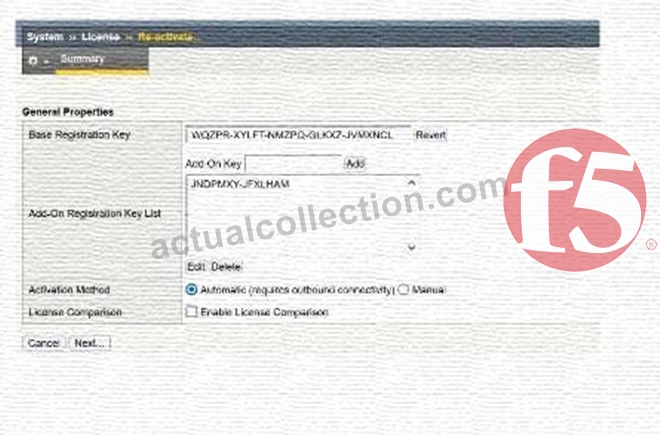
What is the address of the license server to which the BIG-IP device must be able to establish an outbound connection in order to use theAutomatic Activation Method?
- A. activate.f5.com
- B. license.f5.com
- C. callhome.f5.com
- D. ask.f5.com
Answer: A
Explanation:
When you chooseAutomaticas the activation method in the License , Re-activate screen, the BIG-IP device itself contacts F5'slicense activation serviceover the Internet.
For successful automatic activation:
* The BIG-IP must have outbound network connectivity (typically via the management interface).
* DNS resolution and routing must allow it to reach theF5 license activation host(the one shown in option D).
* The device sends its dossier and registration key to that service and receives an updated license file in return, which is then installed automatically.
The other hostnames in the options are not used by BIG-IP for license activation, so they cannot be correct in the context ofAutomatic Activation.
NEW QUESTION # 22
Which configuration file can a BIG-IP administrator use to verify theprovisioned modules?
- A. /config/bigip.conf
- B. /var/local/ucs/config.ucs
- C. /config/bigip_base.conf
- D. /config/bigip.license
Answer: A
Explanation:
Provisioning settings define which modules are enabled and how system resources are allocated to them.
These provisioning declarations are stored in:
/config/bigip.conf
This file contains:
* Full module provisioning statements
* TMSH-equivalent provisioning configurations such as:
* sys provision ltm { level nominal }
* sys provision asm { level nominal }
It is theprimary system configuration filethat stores all active provisioning details.
Why the other answers are incorrect
A). /config/bigip.license
* Showslicensedmodules, not provisioned modules.
B). /config/bigip_base.conf
* Stores base networking (VLANs, Self-IPs, routes), not provisioning.
D). config.ucs
* A backup archive, not a live configuration file.
Thus, the correct file to review active module provisioning is/config/bigip.conf.
NEW QUESTION # 23
Which two items demonstrate thecreation of a new volumefor software images?
(Choose two.)
- A. Using the GUI, go toSystem > Software Management > Available Images > Install, and in the Install Software Image pop-up window, type the new volume name or number and clickInstall.
- B. tmsh install sys software image /shared/images/BIGIP-<version>.iso volume HD1.5 create-volume
- C. tmsh install /sys software image BIGIP-<version>.iso volume HD1.5 create-volume
- D. Using the GUI, go toSystem > Disk Management, selectNew Volume. In the pop-up window, type the name or number of the new volume and clickApply.
- E. tmsh install software image /shared/images/BIGIP-<version>.iso volume HD1.5 create-volume
Answer: D,E
Explanation:
In BIG-IP, software images are installed onboot volumes(for example, HD1.1, HD1.2, HD1.3, etc.).
To install software on anew volume, the administrator must instruct the system to create a new boot location before installation.
There are two correct ways to create a new volume:
A). tmsh command (with correct syntax)
tmsh install software image /shared/images/BIGIP-<version>.iso volume HD1.5 create-volume This syntax correctly includes:
* install software image
* full path to ISO (/shared/images/...)
* volume name (HD1.5)
* create-volumekeyword
This instructs BIG-IP to create the new boot volume as part of the installation.
C). Using the GUI # System > Disk Management
From the Disk Management menu, the administrator can:
* Select "New Volume"
* Enter the volume identifier (e.g., HD1.5)
* Apply changes
This GUI method is officially supported and explicitly creates a new boot volume before installing the software.
Why the other options are incorrect:
B). Incorrect tmsh syntax
* Missing /shared/images/ path
* Incorrect command structure
D). Incorrect command structure
* Missing required keywords and correct command hierarchy
E). Software Management # Install does NOT create volumes
* This installs to anexistingvolume only
* The GUI install dialog does not create new boot volumes
Thus, onlyOption AandOption Cproperly create a new software volume.
NEW QUESTION # 24
The monitoring team reports that the SNMP server is unable to poll data from a BIG-IP device.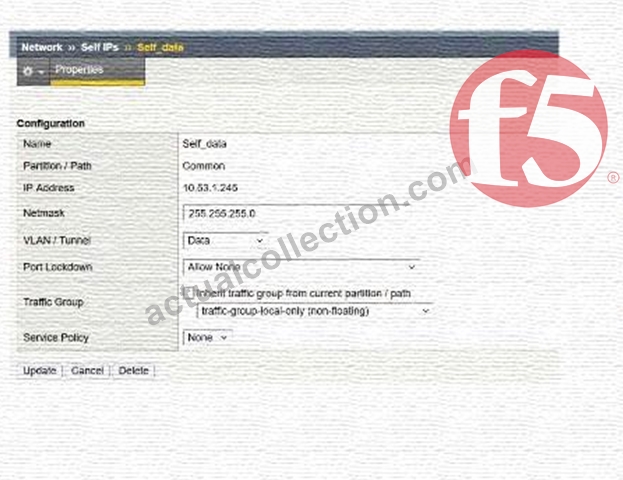
What information will help the BIG-IP Administrator determine whether the issue originates from the BIG-IP system?
- A. The "VLAN / Tunnel" setting must allow All Vlans.
- B. The "Port Lockdown" setting is preventing the SNMP server from polling data from the BIG-IP.
- C. The "Traffic Group" setting must use a floating Traffic Group.
- D. The configuration on the exhibit is correct and other options should be explored.
Answer: B
Explanation:
The exhibit shows aSelf IPwith:
* VLAN:Data
* Port Lockdown:Allow None
Impact of "Allow None" on SNMP
When a Self IP is configured with:
Port Lockdown: Allow None
the BIG-IP blocksallservices and ports except a few hardcoded HA communication ports.
This means:
* UDP/161 (SNMP)is blocked
* UDP/162 (SNMP traps)is blocked
* The SNMP server cannot poll or receive data from the BIG-IP through this Self IP SNMP relies on access through the Self IP if out-of-band (mgmt interface) is not used.
Thus, the issue is directly caused byPort Lockdown = Allow None, which prevents SNMP communication.
Why the other options are incorrect:
B). Traffic Group must use a floating Traffic Group
* SNMP polling doesnotrequire floating Self IPs.
* Floating groups apply to HA failover IPs, not SNMP functionality.
C). VLAN/Tunnel must allow All VLANs
* Self IPs are always bound to a VLAN; SNMP doesnotrequire All VLANs.
* As long as the Self IP belongs to a reachable VLAN, SNMP can work.
D). Configuration is correct
* It is not correct:Allow Noneblocks SNMP and is the problem.
NEW QUESTION # 25
An F5 VE has been deployed into a VMware environment via an OVF file.
An administrator wants to configure the management IP address so the VE can be accessed for further setup.
Which two are valid methods for configuring the management-ip address? (Choose two.)
- A. Log into the remote console and configure the management IP through TMSH using:
create sys management-ip <ip address>/<mask> - B. Log into the remote console and configure the management IP through TMSH using:
create ltm management-ip <ip address>/<mask> - C. Log into the remote console and configure the management IP by running thesetupcommand.
- D. Log into the remote console and configure the management IP by running theconfigexecutable.
Answer: A,D
Explanation:
A newly deployed BIG-IP Virtual Edition (VE) in VMware requires initial configuration of itsmanagement- ipaddress so it can be accessed over the network. F5 provides several valid mechanisms during initial console access:
A). Running the config utility
* The config script is available on new BIG-IP installations and VE deployments.
* It launches a guided text-based wizard allowing configuration of:
* Management IP
* Netmask
* Default route
* This is a standard and recommended method during first-time setup.
B). Using TMSH with create sys management-ip
* Administrators can enter TMSH directly from the console and run:
* create sys management-ip <ip>/<mask>
* The management-ip object resides undersys, not under ltm or any other module.
* This is the correct tmsh method for defining the management interface address.
Why the other options are incorrect:
C). create ltm management-ip
* There isnosuch object under /ltm.
* LTM handles traffic objects (virtual servers, pools), not system management interfaces.
D). Running the setup command
* The setup command is used for general system configuration butdoes not configure the management- ip.
* It is not the supported method for initial management IP assignment on VE deployments.
Therefore, the valid methods are running theconfigutility and using thesys management-ipcommand within TMSH.
NEW QUESTION # 26
A BIG-IP Administrator needs to purchase new licenses for a BIG-IP appliance.
The administrator needs to know:
* Whether a module is licensed
* The memory requirement for that module
Where should the administrator view this information in theSystem menu?
- A. Resource Provisioning
- B. Configuration OVSDB
- C. Configuration Device
- D. Software Management
Answer: A
Explanation:
To understand:
* Which modules arelicensed
* Which modules areprovisioned
* Theresource requirements(CPU / RAM) of each module
The administrator uses:
System Resource Provisioning
This page displays:
* All modules present in the license
* Whether they are enabled or disabled
* Required memory to activate each module
* CPU and disk allocation information
* Provisioning level options (None / Minimal / Nominal / Dedicated)
This is the exact location where BIG-IP administrators evaluate module capacity before enabling or purchasing licensing upgrades.
Why the other options are incorrect:
A). Configuration OVSDB
* Used for network virtualization integrations, not licenses or modules.
B). Software Management
* Used for software image installation, not licensing.
C). Configuration Device
* Displays hostname, failover settings, device properties - not module resource requirements.
Thus, module licensing and memory requirement data are found underResource Provisioning.
NEW QUESTION # 27
The BIG-IP Administrator needs to update access to the Configuration Utility to include the172.28.31.0/24and
172.28.65.0/24networks.
From the TMOS Shell (tmsh), which command should the BIG-IP Administrator use to complete this task?
- A. modify /sys httpd permit add { 172.28.31.0/255.255.255.0 172.28.65.0/255.255.255.0 }
- B. modify /sys httpd allow add { 172.28.31.0/255.255.255.0 172.28.65.0/255.255.255.0 }
- C. modify /sys httpd allow add { 172.28.31.0 172.28.65.0 }
Answer: B
Explanation:
Access to the BIG-IP Configuration Utility (TMUI) is controlled through the/sys httpd allowlist.
This list defines which IP addresses or subnets are allowed to connect to the management web interface.
To allow two new subnets-172.28.31.0/24and172.28.65.0/24-the administrator mustaddboth subnets to the existing list without removing current entries.
In tmsh, subnet entries must be specified innetwork/netmask format, for example:
172.28.31.0/255.255.255.0
The correct tmsh command to append these networks is:
modify /sys httpd allow add { 172.28.31.0/255.255.255.0 172.28.65.0/255.255.255.0 } Why the other options are incorrect:
Option B:
* IPs are listed without masks, which is invalid for subnet-based access control.
* The system requiresnetwork/netmaskformat.
Option C:
* The command uses permit instead of allow, which is not a valid attribute of /sys httpd.
* The correct keyword must beallow.
Thus, onlyOption Acorrectly adds both permitted subnets in the proper tmsh format.
NEW QUESTION # 28
When is theLicense Service Check Dateenforced on a BIG-IP system?
- A. During system startup
- B. During a software install
- C. After editing a virtual server
Answer: B
Explanation:
TheService Check Datedetermines whether a particular software version is allowed to run under the device's license.
* When installing or upgrading TMOS, the installer checks theService Check Datestored in the BIG-IP license file.
* If the license date isolderthan the minimum required for the target version, the software installation is blocked.
* This check happensspecifically during a software install, not during routine device operations.
Editing virtual servers or system startup do not trigger this validation.
Thus, the enforcement happensduring software installation.
NEW QUESTION # 29
The monitoring team reports that the SNMP server is unable to poll data from a BIG-IP device.
What information will help the BIG-IP Administrator determine whether the issue originates from the BIG-IP system?
- A. The "VLAN / Tunnel" setting must allow All Vlans.
- B. The "Port Lockdown" setting is preventing the SNMP server from polling data from the BIG-IP.
- C. The "Traffic Group" setting must use a floating Traffic Group.
- D. The configuration on the exhibit is correct and other options should be explored.
Answer: B
Explanation:
The exhibit shows aSelf IPwith:
* VLAN:Data
* Port Lockdown:Allow None
Impact of "Allow None" on SNMP
When a Self IP is configured with:
Port Lockdown: Allow None
the BIG-IP blocksallservices and ports except a few hardcoded HA communication ports.
This means:
* UDP/161 (SNMP)is blocked
* UDP/162 (SNMP traps)is blocked
* The SNMP server cannot poll or receive data from the BIG-IP through this Self IP SNMP relies on access through the Self IP if out-of-band (mgmt interface) is not used.
Thus, the issue is directly caused byPort Lockdown = Allow None, which prevents SNMP communication.
Why the other options are incorrect:
B). Traffic Group must use a floating Traffic Group
* SNMP polling doesnotrequire floating Self IPs.
* Floating groups apply to HA failover IPs, not SNMP functionality.
C). VLAN/Tunnel must allow All VLANs
* Self IPs are always bound to a VLAN; SNMP doesnotrequire All VLANs.
* As long as the Self IP belongs to a reachable VLAN, SNMP can work.
D). Configuration is correct
* It is not correct:Allow Noneblocks SNMP and is the problem.
NEW QUESTION # 30
......
Latest F5 F5CAB1 Dumps with Test Engine and PDF: https://examcollection.actualcollection.com/F5CAB1-exam-questions.html